Free for the two of you · Built for weddings in Mexico
Your wedding guest list, finally under control.
RSVPs, plus-ones, and both sides — in one list.
Who’s invited, who’s confirmed, and how many you really are — without chasing replies across WhatsApp, spreadsheets, and memory.
Free for the two of you · No credit card · Your list stays private
Guests
96 confirmed · 120 totalRSVP updated
- Six clear statuses, from "To invite" to "Confirmed"
- Plus-ones linked to their guest, in the total from day one
- Bride’s side and groom’s side, without two separate lists
The problem
The guest list looks simple — until it starts deciding everything else.
It starts as a note on your phone. Then the list grows on both sides, each side lives in a different spreadsheet, and RSVPs arrive over WhatsApp, by phone, and in passing. You end up with three versions that don’t match — and none of them answers the only question that matters: how many people are coming?
OPHIRA treats your list as what it really is: the first structural decision of the wedding. Every person with their status, their plus-one, and their side — and a total you can actually trust, every time you open it.
One list, both sides
Both families in one list, grouped by family, friends, or work — no parallel copies.
Statuses that give you a number
How many are coming? Confirmed, pending, and maybe: the count updates itself with every change.
No uncounted plus-ones
Every plus-one is linked to their guest — with a status of their own, in the total from the start.
How it works
From a note on your phone to a headcount you can trust.
Get the list out of your head
Add guests in seconds with the quick-add row: name, side, and group. No long forms — get everyone in first, refine later.
Mark each reply as it lands
To invite, Invited, Confirmed, Maybe, Follow up, Declined — six statuses that cover real life. Filter by status or by side and you know exactly who still owes you an answer.
Decide with the real number
Your confirmed count is your real number: catering is priced per person — that’s the figure you take to every quote — and seating is built from the people actually coming. Your list stops being a guess and becomes your baseline.
96
confirmed out of 120 guests
Inside OPHIRA
Your guest list, exactly as you'll use it.
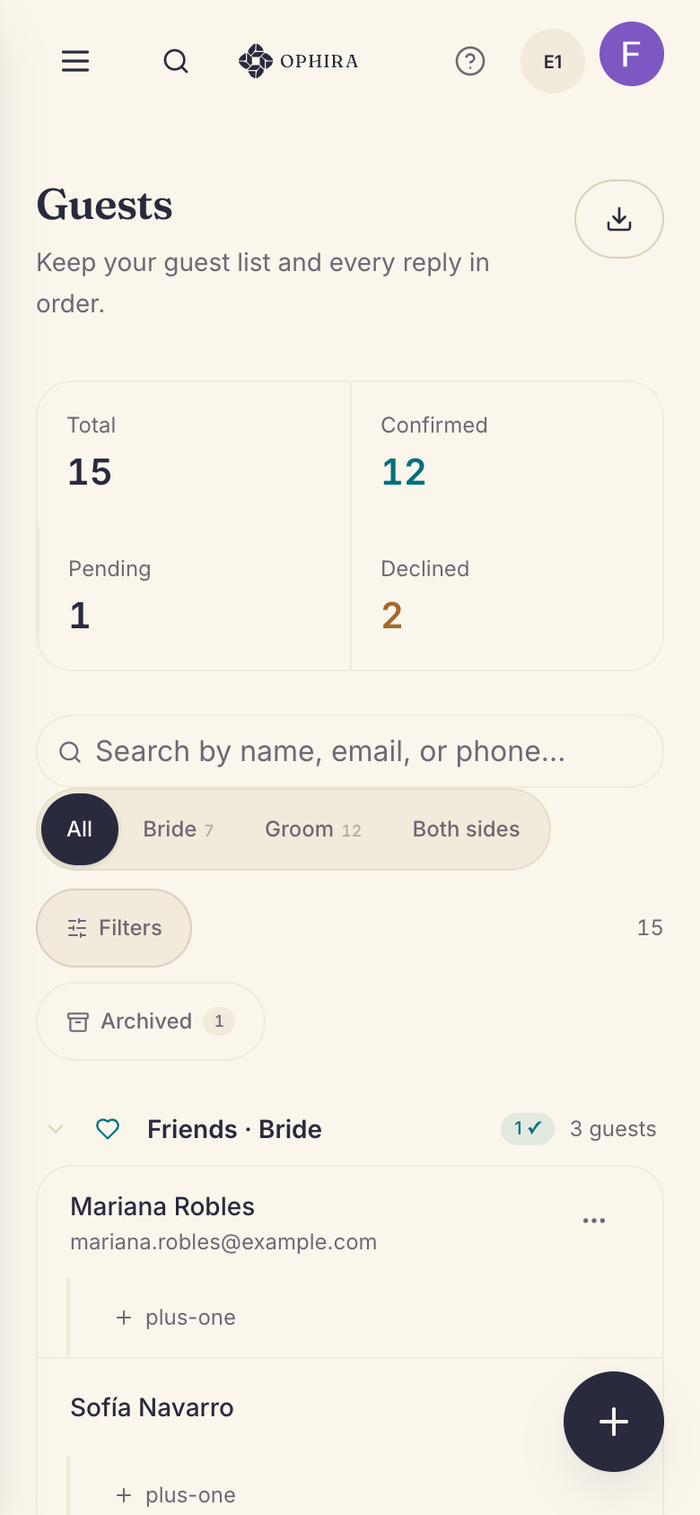
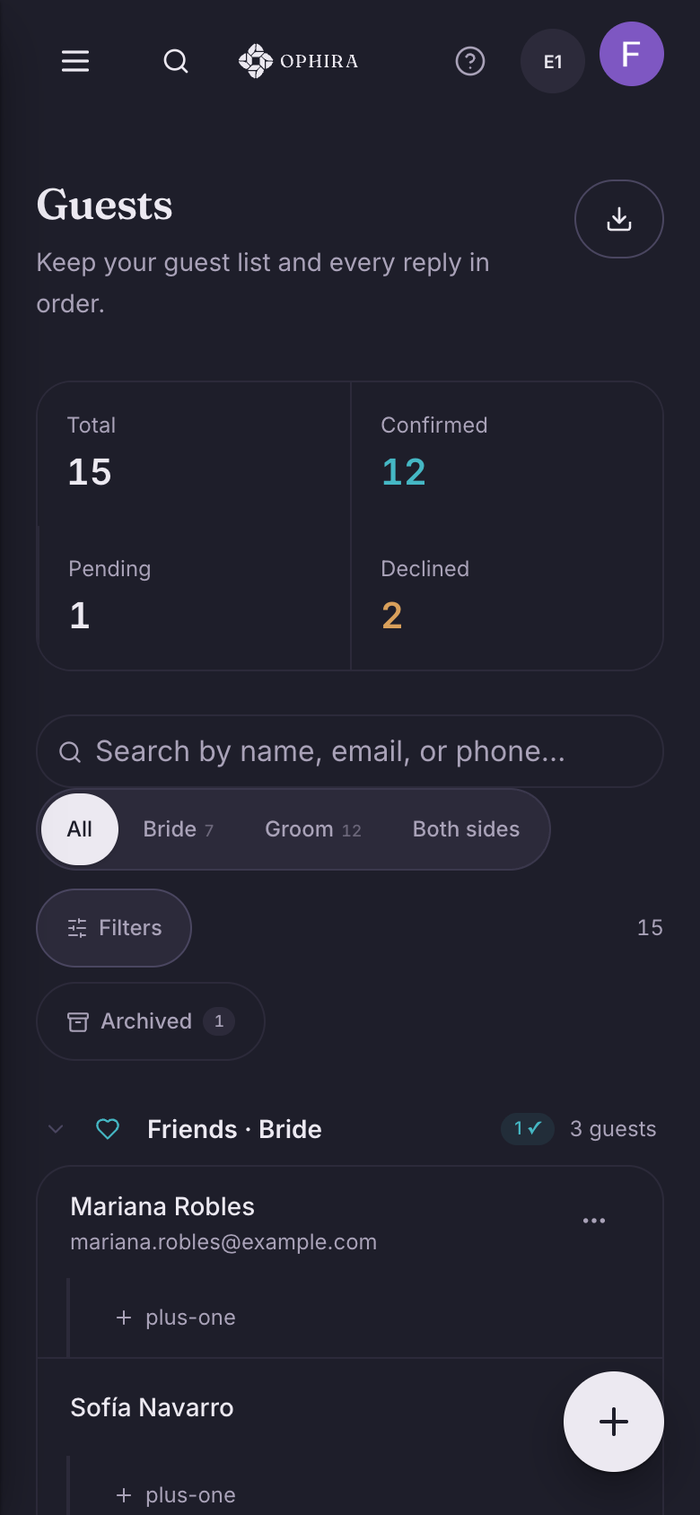
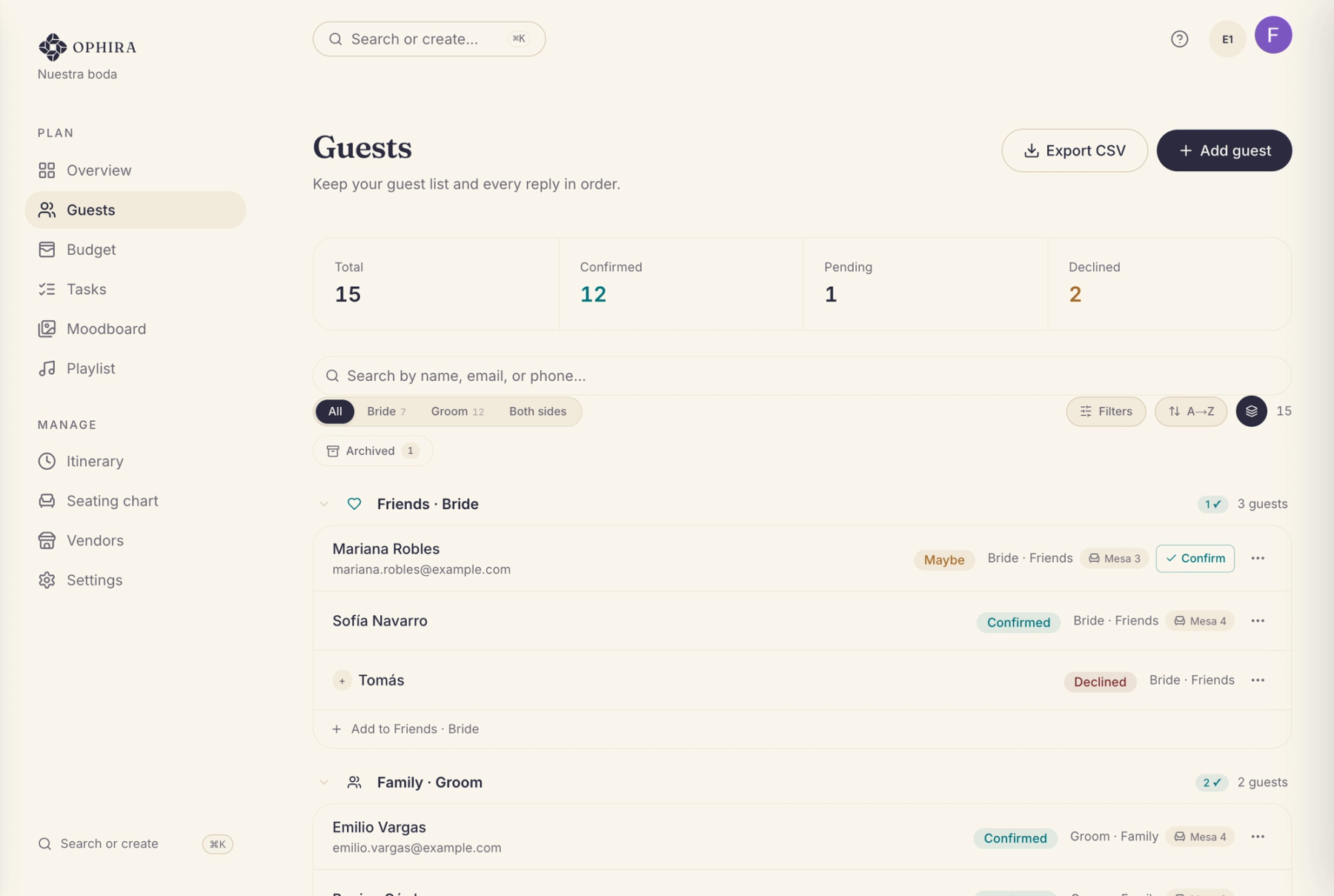
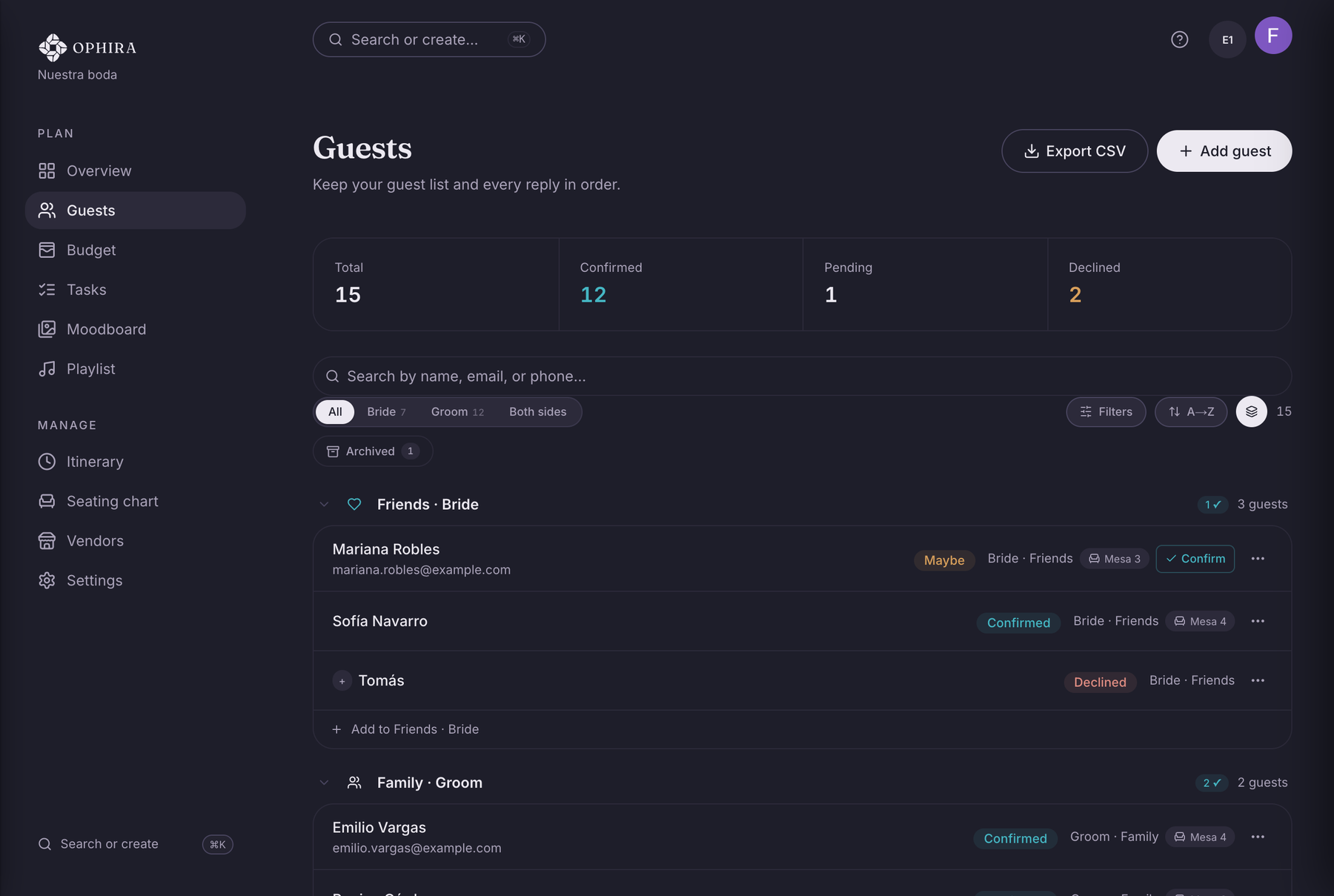
The Guests screen keeps statuses, plus-ones, and the current count in view — on your computer or phone, in light or dark mode.
The statuses
Six statuses, zero ambiguity.
A useful list doesn’t just say yes or no — it tells you where each person stands. These are the six statuses OPHIRA tracks for every guest, the same ones you’ll see in the app:
On your radar, not invited yet. Part of your working total, not your confirmed count.
The invitation is out; the reply is on its way.
They’re coming. This is the number caterers, seating, and every per-person quote care about.
An honest half-answer. Better tracked as a maybe than rounded up to a polite yes.
No reply yet — the filter shows you exactly who to ask.
They can’t make it. Recorded, not deleted.
You update the statuses yourself — that’s what keeps the list honest when replies arrive over WhatsApp, by phone, or through the family grapevine. One click, and the counts update on their own.
What’s included
Everything a real guest list needs.
Both sides, one list
Every guest is tagged with a side — bride’s, groom’s, or both — and one filter shows you either one.
From the list to the tables
When it’s time for seating, your confirmed guests flow into the table map — nobody gets typed in twice.
Plan it together
One space for the two of you: same list, same counts, no competing versions. Your partner joins free.
You invite; OPHIRA keeps track
OPHIRA doesn’t send invitations: you invite over WhatsApp, by phone, or in person, and log each reply on your list.
Your list is yours
Export everything to CSV whenever you want: for the venue, the caterer, or your own records.
Private by design
Your list lives in your space. Never shared with vendors or anyone else without your permission.
In confidence
Your list isn’t a lead.
Your guest data exists to plan your wedding — not to feed anyone’s pipeline. Here’s what we do and what we don’t, said before you have to ask.
Your information is never sold
We don’t sell or rent your information — or your guests’. The list lives in your private space.
Vendors don’t see your list
Names, statuses, and notes stay with you. If you request a quote, only the brief you choose travels — the category and, if you want, city, date, or an estimated headcount. Requesting one costs nothing and commits you to nothing.
Free — and you know why
Vendors pay to quote for you when you ask them to — not for your data. That’s why your plan costs nothing.
Every seat is money.
Catering — the single biggest line in a Mexican wedding budget — is priced per person: your guest list is the strongest lever your budget has. When the list is clear, the budget follows.
Guides for building your list
How to build your wedding guest list
The six-question audit that turns the list into pesos.
Read the guideSeating your guests without redoing the map
The sequence that saves you from rebuilding it five times.
Read the guideMonth-by-month wedding checklist (in Spanish)
The complete list so nothing slips — your guest list included.
Read the guideCommon questions
Where do I start with my wedding guest list?
Start by dumping every name you can think of, with their side and group, no filtering yet. Then sit down together with two numbers in front of you — your budget and your venue’s capacity — and decide who actually gets an invitation. In OPHIRA the quick-add row captures everyone in seconds, and the statuses handle the follow-up.
How many guests should we invite?
There’s no right number: there’s the number your budget and your venue can hold. Catering is priced per person and is usually the biggest single line — around 30–40% of the total in Mexico — so every seat moves the result. Decide what you’re willing to spend and what your venue holds first; the list follows from there, not the other way around.
Can I just use a spreadsheet for my guest list?
For a first pass, sure. It falls apart once things start changing: RSVPs arriving over WhatsApp, last-minute plus-ones, two families editing different copies. A spreadsheet stores rows; it doesn’t tell you who still owes you an answer or update the counts by status. That’s the part OPHIRA handles — free for the two of you. And you still end up with the spreadsheet when you need one: export your list to CSV whenever the venue or the caterer asks.
How do plus-ones work?
Each plus-one is linked to their main guest: added in one click, inheriting their group, in the total from the start — with a confirmation status of their own. Plus-ones stop being an asterisk in a cell and become people with a name and a status, which is exactly how the caterer will bill them.
Can we keep the bride’s and groom’s lists separate?
Yes — without splitting the list in two. Every guest is tagged with a side, and filters show each side on its own or the whole wedding at once. One source of truth, two views.
Can guests RSVP on their own?
OPHIRA doesn’t send your invitations or collect RSVPs for you: replies arrive the way they always do — WhatsApp, a call, in passing — and you log each one in a click. The count stays yours, and it stays current.
What do I do with guests who never reply?
Mark them "Follow up": the filter hands you the exact list of who to write to, without rereading the whole sheet. And as the date gets closer, an honest "Maybe" is worth more than silence counted as a yes.
Is the guest list tool free? Who can see my list?
It’s free for the two of you: no credit card, no limited version. Your list lives in your private space and is never shared with vendors or anyone else without your permission. If someone else joins to help you plan — your mom, a planner — they come in as a collaborator on a paid seat.
Is the app itself in English?
Yes. Sign up from this page and your account is set to English from the start — the app, our emails, and the help center. What stays in Spanish is what goes out to a Mexican vendor on your behalf, like a quote request, because that is the language it will be answered in.
Still have a question? Visit the Help Center
Your people, truly counted.
Your list, finally under control.
Set up your space and get the list out of your head today. When the replies start landing, they’ll have somewhere to go — and six months in, the list will still be telling you the truth.
Start my list for freeFree for the two of you · No credit card · Private by design